How to Build an AI Agent with Local LLM and Tool Calling: Ollama + MCP Integration Guide
When implementing LLM solutions for enterprise, one of the biggest challenges is enabling AI models to access real-time data and execute actions. The Model Context Protocol (MCP) provides a standardized approach for AI agent development that solves this through function calling capabilities.
In this AI integration tutorial, we'll build a conversational AI agent that:
- Runs on private infrastructure using Ollama—your data never leaves your systems
- Connects to extensible tool servers for real-time data access
- Supports AI automation workflows across your existing business systems
- Enables agentic AI patterns with multi-step reasoning
What is the Model Context Protocol?
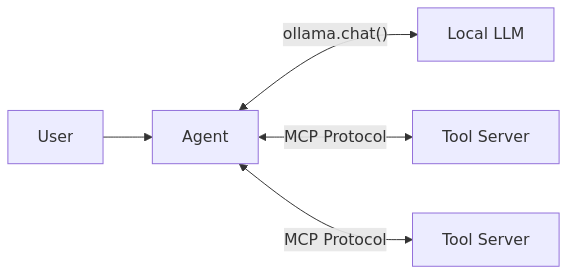
MCP enables LLM tool integration through a standardized interface. Think of it as an API layer between your AI orchestration system and external capabilities.
| Concept | Role in AI Agent Architecture |
|---|---|
| Protocol | JSON-RPC 2.0 messaging for AI-to-tool communication |
| Server | Exposes callable functions your LLM can invoke |
| Client | Discovers and executes tools at runtime |
| Tool Schema | Auto-generated specifications enabling function calling |
Step 1: Creating Tool Servers for LLM Integration
The first step in AI agent development is exposing your business logic as tools. MCP's FastMCP makes this simple—register Python functions and the framework handles LLM function calling specifications automatically.
from mcp.server.fastmcp import FastMCP
import tools

# Initialize tool server for AI agent integration
mcp = FastMCP("weather-tools-server", host="0.0.0.0", port=8000)

# Register functions as LLM-callable tools
mcp.add_tool(tools.get_weather)
mcp.add_tool(tools.current_date)

if __name__ == "__main__":
    mcp.run(transport='sse')
How tool schema generation works: FastMCP introspects your functions and builds JSON Schema specifications that enable LLM tool calling:
def get_weather(lat: float, lon: float, start_date: str, end_date: str) -> dict:
    """Get weather data for AI-powered analysis."""
This generates the function calling specification automatically—no manual schema writing required.
Step 2: Building the MCP Client for AI Orchestration
For enterprise AI deployment, your agent needs to discover and invoke tools dynamically. The MCP client handles AI-to-service communication:
from mcp.client.sse import sse_client
from mcp.client.session import ClientSession

class MCPClient:
    """Client for AI agent tool integration via MCP protocol."""

    def __init__(self, server_url: str):
        self.server_url = server_url

    async def list_tools(self):
        """Discover available tools for LLM function calling."""
        async with sse_client(self.server_url) as streams:
            async with ClientSession(streams[0], streams[1]) as session:
                await session.initialize()
                return (await session.list_tools()).tools

    async def call_tool(self, name: str, arguments: dict):
        """Execute tool call from AI agent."""
        async with sse_client(self.server_url) as streams:
            async with ClientSession(streams[0], streams[1]) as session:
                await session.initialize()
                result = await session.call_tool(name, arguments)
                return result.content[0].text
This AI integration pattern enables runtime tool discovery—add new capabilities without modifying your agent code.
Step 3: Adapting Tools for Local LLM Deployment
When using Ollama for on-premise AI deployment, tools must appear as Python callables. This wrapper bridges MCP tool integration with Ollama's API:
class ToolWrapper:
    """Adapts MCP tools for local LLM function calling."""

    def __init__(self, client: MCPClient, tool_info):
        self.client = client
        self.__name__ = tool_info.name
        self.__doc__ = tool_info.description

        # Convert JSON Schema to Python signature for LLM introspection
        schema = tool_info.inputSchema
        parameters = [
            inspect.Parameter(name, kind=inspect.Parameter.KEYWORD_ONLY,
                annotation=self._map_type(prop.get("type")))
            for name, prop in schema.get("properties", {}).items()
        ]
        self.__signature__ = inspect.Signature(parameters)

    def __call__(self, **kwargs):
        """Execute AI agent tool call."""
        return asyncio.run(self.client.call_tool(self.__name__, kwargs))
This enables private LLM deployment with full tool calling capabilities—your AI agent can access external data while keeping inference local.
Step 4: Implementing the AI Agent with Function Calling
The core of agentic AI implementation—an agent loop that handles LLM tool calling and AI automation:
class Agent:
    """Conversational AI agent with tool calling capabilities."""

    def __init__(self, model: str, tools: list):
        self._model = model
        self._tools = {tool.__name__: tool for tool in tools}
        self._context = []

    def process_request(self, message: str):
        """Process user request with AI orchestration."""
        self._context.append({"role": "user", "content": message})

        while True:
            # LLM inference with function calling enabled
            response = ollama.chat(
                model=self._model, messages=self._context,
                tools=self._tools.values(), stream=True
            )

            content, tool_calls = "", []
            for chunk in response:
                if chunk.message.content: content += chunk.message.content
                if chunk.message.tool_calls: tool_calls.extend(chunk.message.tool_calls)

            self._context.append({"role": "assistant", "content": content, "tool_calls": tool_calls})

            if not tool_calls: break  # AI agent completed reasoning

            # Execute tool calls for AI automation workflow
            for tc in tool_calls:
                result = self._tools[tc.function.name](**tc.function.arguments)
                self._context.append({"role": "tool", "tool_name": tc.function.name, "content": result})
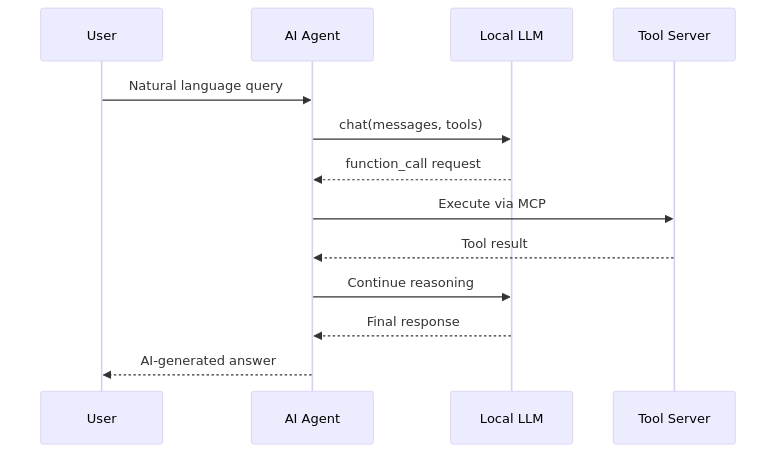
This AI agent pattern supports multi-step reasoning—the LLM can call multiple tools before synthesizing a final response.
Step 5: Enterprise AI Deployment Configuration
For production AI deployment, configure your tool servers:
{"mcpServers": {"weather": {"url": "http://localhost:8000/sse"}}}# Production-ready AI agent initialization
toolbox = ToolBox(config["mcpServers"])
available_tools = toolbox.load_tools() # Dynamic tool discovery
agent = Agent(model="qwen3", tools=available_tools)
agent.start()AI Agent Request Flow
Benefits for Enterprise AI Implementation
| Requirement | How This Architecture Delivers |
|---|---|
| Data Privacy | Local LLM inference—no external API calls |
| AI Integration | MCP provides standardized tool connectivity |
| Scalability | Containerized, microservices-ready |
| Extensibility | Add AI capabilities by deploying new tool servers |
| AI Automation | Multi-step reasoning with tool execution |
This AI agent architecture provides a foundation for enterprise LLM solutions that combine the power of local AI deployment with extensible tool integration.
Summary
Building an AI agent that combines local LLM deployment with tool calling capabilities enables you to unlock powerful real-time automation and data-driven workflows while keeping sensitive data securely within your own infrastructure. By leveraging MCP’s standardized protocol for tool integration alongside a framework like Ollama, you gain the flexibility to extend your agent’s abilities without redesigning its core logic — whether that’s accessing external services, performing dynamic reasoning, or orchestrating complex multi-step tasks.
In this guide we walked through the key components — from setting up tool servers and adapting them for local LLM access to implementing an orchestration loop that supports function calls. With these foundations in place, your AI agent becomes a scalable, extensible platform capable of bridging conversational intelligence with practical action. As enterprise needs evolve and AI continues to mature, such architectures will be instrumental in building intelligent systems that are secure, responsive, and genuinely useful.
Now that you understand the core architecture and implementation patterns, you’re ready to explore new tools and customize the agent for your specific use cases — whether that’s automating workflows, integrating internal systems, or building next-generation AI applications. Stay curious, keep iterating, and enjoy the journey of combining AI with real-world capabilities!
For more details please check the full implmentation.

Related Posts
Categories
- Pytorch (1)
- Agentic (3)
- Big Data (4)
- Industry 4.0 (1)
- Python (6)
- Ollama (2)
- Spark (1)
- Artificial Intelligence (1)
- LLM (3)
- PostgreSQL (4)
- CNN (1)
- MCP (2)
- Django (2)
- Machine Learning (3)
- Deep Learning (2)
- Industrial Automation (1)
- LangChain (1)