How to Migrate a Databricks Platform from Hive Metastore to Unity Catalog: Deadlines, Risks and a Phased Plan
Since 8 October 2026, every new Databricks workspace starts without the Hive metastore. The workspaces you already run were left alone, which is what makes this a decision rather than an emergency: you can migrate to Unity Catalog on your own schedule now, or wait until a new workspace, an expiring runtime or a switched-off metastore sets the schedule for you.
For most teams the change does not arrive as an announcement. It arrives as a new workspace. Someone builds a disaster-recovery copy, a second region or a fresh staging environment from the same Terraform as production, and the first job fails before it reads a row: the cluster cannot install the shared wheel from DBFS, /mnt/landing does not exist, and features.patient_weekly resolves to a catalog that has never heard of it. Every workspace created on or after 8 October is built that way, on AWS, Azure and GCP alike.
Or it arrives as a business question. Finance wants to cut compute spend, and the obvious answer, serverless compute for jobs and notebooks, needs a workspace enabled for Unity Catalog. Compliance asks for masks on the columns that identify patients, and row filters and column masks exist only in Unity Catalog. Or the platform team notices that 13.3 LTS, the oldest runtime a Unity Catalog-only workspace accepts, reached end of support on 22 August 2026, and that 14.3 LTS follows on 1 February 2027.
This article is for the people who decide when and how that migration happens: CTOs, heads of data and engineering, and the finance and compliance leads who sign it off. It is written for companies whose forecasts run on Databricks, whether they forecast redemptions in an offer programme, policy lapses at an insurer or demand in a healthcare or subscription programme. What you get:
- What changed, and what did not — the October 2026 change, the automatic switch-off for metastores nobody uses, and the 30-day point of no return
- Where the Hive metastore hides — the nine places a typical forecasting platform depends on it, most of them in code rather than data
- The decisions only leadership can make — catalog layout, managed storage, managed or external tables, identity and compute defaults, and the migration strategy
- A plan in six gated steps — assess, decide, bridge with federation and move the tables, rewrite code and compute, move the models, then cut over and lock the metastore
- What it costs and what you get back — the line items that are easy to miss, the published case studies, and the capabilities that exist only in Unity Catalog
Everything below was checked against the Databricks and Microsoft documentation for AWS, Azure and GCP as it stood on 2 November 2026; the dates are the same on all three clouds unless we say otherwise. To keep it concrete, we walk one platform through the migration. The legacy patterns are common in Databricks platforms built before Unity Catalog, while the domain, the names and the code are illustrative.
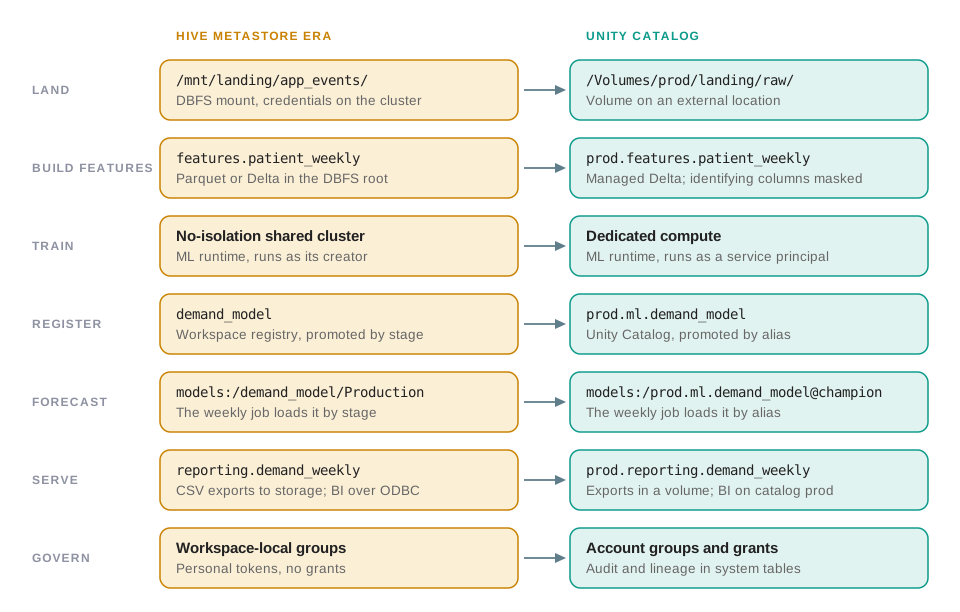 One weekly pipeline, before and after. Only two of the seven rows are about where the data lives; the rest are compute, code, models, consumers and identity, which is where the effort goes.
- July 2026Databricks may now switch off a Hive metastore that looks unused
- 8 Oct 2026every new workspace starts without the Hive metastore
- 1 Feb 2027support ends for 14.3 LTS, the oldest supported runtime
- 30 daysafter a switch-off, the workspace is Unity Catalog-only for good
- Does anything we run create workspaces? A disaster-recovery plan, a new region or a new environment built from your templates now gets a workspace without the Hive metastore.
- What runs on old runtimes, or only a few times a year? Every runtime below 14.3 LTS is already out of support, and a metastore that only quarterly or annual jobs read can look unused.
- Who can read patient-level data today, and by which routes? Credentials on clusters, mounts and no-isolation clusters all sit outside the controls Unity Catalog adds, until they are closed.
What Changed in October 2026, and What Did Not
Databricks has been closing the legacy path in steps. Accounts created after 18 December 2025 never had the Hive metastore, DBFS root and mounts or no-isolation shared compute. From 8 October 2026 the same applies to every new workspace in every account: no DBFS root or mounts, no Hive metastore, no no-isolation shared clusters and no Databricks Runtime older than 13.3 LTS. The account setting that used to control this, Disable legacy features, is now shown as enabled and locked, and the documentation describes no exception. Some older pages and forum answers still give 30 September 2026, the date Databricks first published.
Existing workspaces are not affected. Databricks says that migrating them is "not required by the October 8, 2026 deadline", and it has announced no retirement date for the Hive metastore, or for DBFS root and mounts, in a workspace that still uses them. The labels show where this is going, though. The documentation calls the per-workspace Hive metastore a legacy feature, a status Databricks defines as "indicative of a future retirement date", and it labels DBFS root and mounts deprecated, which it defines as "The feature will soon be retired".
Three things do put a clock on an existing workspace:
- An automatic switch-off. The documentation on disabling Hive metastore access says that in a workspace with no activity against the metastore, legacy access "might be disabled automatically on your behalf starting in July 2026". It does not define activity, give an observation window or describe a notice.
- A point of no return. Once direct metastore access is disabled, jobs against Hive tables fail, the
hive_metastorecatalog disappears from Catalog Explorer, and jobs on runtimes below 13.3 fail (runs already in progress continue until they end, but their clusters cannot be restarted). The change can be reversed for 30 days; after that, the workspace permanently becomes Unity Catalog-only. The page makes no exception for an automatic switch-off, though it does not discuss that case. - Runtimes. 13.3 LTS reached end of support on 22 August 2026, 10.4 LTS and every earlier version have reached end of life, and 14.3 LTS, now the oldest supported LTS, ends support on 1 February 2027. After end of support, Databricks' policy is no support and no fixes, and the runtime can no longer be picked in the compute UI, only through the API. At end of life, workloads on it fail. Databricks aims to set that six months after end of support, but reserves the right to remove a version at any time after support ends, without notice; 13.3 LTS has no announced end-of-life date yet.
If the Hive tables that are left are read only by a job that runs once a quarter or once a year, such as an annual retrain or a yearly report, the workspace can show no Hive metastore activity for months, however busy it is otherwise. Databricks does not say what counts as activity, so treat a rarely used metastore as at risk, and find out now which jobs still depend on it.
The consequence that reaches leadership first is usually about new workspaces. Databricks tells admins to remove legacy features from their workspace provisioning, their CI/CD scripts and their runbooks. Read that as: any disaster-recovery, new-region or new-environment workspace you create from now on is Unity Catalog-only. A recovery plan that assumes a Hive metastore in the standby workspace fails on the day the standby has to be built, and Databricks' own disaster-recovery guide still describes, on all three clouds, keeping Hive metastore table definitions in step between the primary and secondary workspaces. On AWS and Azure the guide now opens by recommending managed disaster recovery, a gated option that needs Unity Catalog and replicates Unity Catalog metadata, managed tables and workspace assets, leaving Hive tables to its do-it-yourself guidance.
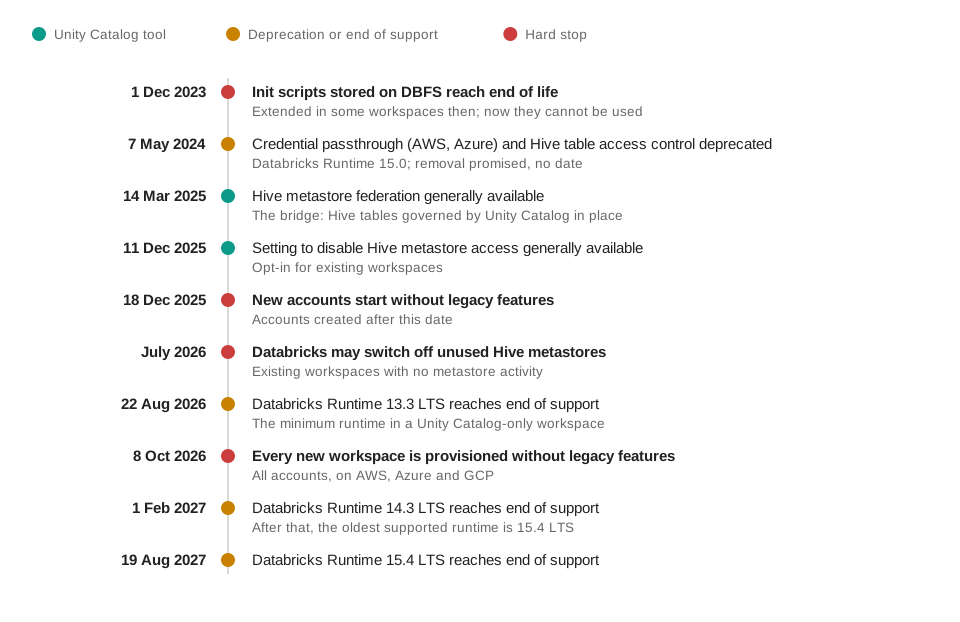 The legacy path has been closing in steps since 2023. What is still ahead is mostly runtimes, and the automatic switch-off can already happen, with no published end to its rollout.
On Azure, one more change runs in parallel: since 1 October 2026, remaining Standard-tier workspaces are being upgraded to Premium in a phased rollout. That makes Unity Catalog available to them, but it migrates nothing.
What Is Unity Catalog, and What Changes for the Business?
A few terms first, because the rest of the article leans on them:
- Workspace
- One Databricks environment, with its notebooks, jobs and compute. Most dates in this article apply per workspace, and a disaster-recovery copy is a workspace too.
- Hive metastore
- The catalogue of table definitions (names, columns, file locations) that each workspace kept for itself before Unity Catalog, unless it was pointed at an external Hive metastore instead (on AWS, possibly Glue), which several workspaces could share.
- DBFS root and mounts
- The DBFS root is a file system in the storage created with a classic workspace (its workspace storage, which also holds Databricks' own system data), and the default home of Hive managed tables; some migration pages use "workspace storage" for the DBFS root itself. A mount maps a cloud storage path under
/mnt, with the credentials stored on the mount. - Managed and external tables
- For a managed table the metastore owns the files, and dropping the table deletes them. An external table points at files in a location you own, and they stay when the table is dropped.
- Access modes
- How a cluster separates the people using it. On a no-isolation shared cluster, nothing separates them: everyone's code runs in one shared environment, shares the cluster's credentials, can reach any table in the workspace's Hive metastore and can see the API tokens Databricks provisions for the other users, an admin's included. Standard compute isolates users from each other, dedicated compute belongs to one user or group, and both enforce Unity Catalog.
- Serverless compute
- Compute that Databricks runs for you in its own cloud account, in the same region as the workspace, billed per use with the machines included.
Unity Catalog is Databricks' governance layer for data and AI. The Hive metastore belongs to one workspace; Unity Catalog lives at the account level, with one metastore per region shared by the workspaces in it, and names everything in three levels, such as prod.features.patient_weekly:
| Component | What it does | What it replaces |
|---|---|---|
| Metastore | The top-level container for a region, attached to the workspaces in that region | The per-workspace Hive metastore |
| Catalog and schema | The first two parts of every name; the natural unit for environments, domains and ownership | Databases, with two-level names |
| Storage credential and external location | Governed access to a cloud storage path, granted like any other privilege | Mounts, and credentials set on clusters |
| Managed storage location | Where managed tables and volumes live, set per metastore, catalog or schema | The DBFS-root warehouse |
| Volume | Governed files: landing extracts, wheels, init scripts, checkpoints, exports | DBFS root and /mnt paths |
| Account groups and service principals | The identities Unity Catalog grants access to | Workspace-local groups and personal tokens |
| Standard, dedicated and serverless compute | The compute that enforces Unity Catalog | No-isolation shared clusters |
| System tables | Billing, audit, lineage and query history as tables | — |
| Foreign catalog | The legacy metastore mirrored inside Unity Catalog through Hive metastore federation: the bridge | — |
For the business, three changes matter more than the names. Permissions become explicit: in a Hive-era platform, access is often whoever has the workspace and the cluster's credentials, and after the migration every job, dashboard and analyst needs a grant. Environments become catalogs rather than naming conventions. And the platform starts recording lineage for every table it governs, next to audit and billing data you can query like any other table.
Where the Hive Metastore Hides in a Forecasting Platform
Here is the platform. A healthcare subscription programme enrols patients in a care plan: they use an app to book sessions with clinicians and reorder supplies. Every week, its Databricks platform turns the latest extracts into patient-level features, such as where each patient is in their care plan and when their next supplies are due, and adds them up for every clinic and region. A model trained on those totals forecasts session bookings for each clinic and supply orders for each region. The forecasts name no patient and the model predicts nothing about any individual, but everything upstream of the totals is patient-level health data. Clinic managers read the forecasts in a dashboard; regional managers read the trends in a BI tool.
It was built the way many platforms were built before Unity Catalog. Extracts land under a DBFS mount. Features are written into the workspace's own warehouse as tables with two-level names. A weekly job trains a gradient-boosted model on an ML runtime and promotes it by stage in the Workspace Model Registry. The jobs are JSON specs pushed through the Jobs API with a personal access token. None of this is unusual, and that is the point: these are the places a migration has to touch.
| Where it hides | In this platform | In a Unity Catalog-only workspace | The replacement |
|---|---|---|---|
| Storage paths | Extracts read from /mnt/landing; intermediate files staged under /dbfs/tmp |
DBFS root and mounts are unavailable on every compute type, so /mnt/landing and /dbfs/tmp fail (in today's workspace, standard compute already blocks /dbfs file access) |
External locations with volumes on top; code uses /Volumes/... |
| Table names | Every read and write uses two-level names such as features.patient_weekly |
Names resolve against a Unity Catalog default catalog, where the tables do not exist | Three-level names or USE CATALOG; a federated catalog as the default during the move |
| Where tables live | Managed tables in the DBFS-root warehouse, several in Parquet; a few external Delta tables | Tables in the DBFS root cannot be registered in place, and managed tables must be Delta or Iceberg | Copy with DEEP CLONE or CTAS; register external tables over the same files, then convert them |
| Credentials on clusters | A storage key or service-principal secret in the Spark configuration, or an instance profile | They bypass Unity Catalog, and Databricks recommends removing them | Storage credentials and external locations, granted per group |
| Compute | Job clusters created through the API without an access mode, so they run as no-isolation shared clusters | No-isolation shared clusters do not exist | Standard compute for ETL, dedicated for the ML runtime, serverless where it fits |
| Spark APIs | spark.sparkContext, an RDD step and input_file_name() in the shared library |
RDD APIs and SparkContext are not supported on standard compute or serverless; input_file_name() is not available on Unity Catalog and is unsupported from Runtime 17.3 LTS |
The DataFrame API, spark.conf and the _metadata column |
| Libraries and init scripts | A wheel and an init script on DBFS | DBFS is no longer a library source, and init scripts on DBFS are end of life | Volumes, with the init script on the admin allowlist that standard compute requires |
| Models | demand_model promoted by stage; the forecasting job loads models:/demand_model/Production |
The Workspace Model Registry is legacy, and Unity Catalog has no stages | Models in Unity Catalog, promoted by alias |
| Identity and consumers | Workspace-local groups, personal tokens and jobs that run as their creator; BI over ODBC on two-level names; CSV exports to storage | Grants work only for account-level identities, and every consumer has to point at a catalog | Account groups, service principals as job identities, explicit grants |
Notice how little of that list is data. In platforms of this age, the legacy assumptions typically sit in storage paths, table names, cluster specs, Spark calls, the model registry, identity, CI and tests, often in shared code that many jobs call. Nubank, which moved 1.1 million tables, said the same about its own migration: "by far, the biggest technical challenge that we had was the code migration."
Many legacy jobs refresh a table by dropping it and creating it again. Under Unity Catalog the new table starts without whatever was attached to the old one (its grants, tags, comments, row filters and column masks), and the job still succeeds. Only what is granted at schema or catalog level survives. Databricks strongly recommends CREATE OR REPLACE TABLE instead, which keeps the table's history, grants, row filters and column masks; it works for Delta and Iceberg tables. Find these jobs before you add any governance, or it will be undone every week.
That inventory is what the plan works through. We run it in six steps, each closed by a gate. Steps 3 to 5 repeat pipeline by pipeline: within a pipeline, the bridge and its compute come first, then the code, then its tables and models, as the migration flow below shows. Most changes have a way back for as long as the old data is kept, and the few that do not are listed in Step 6:
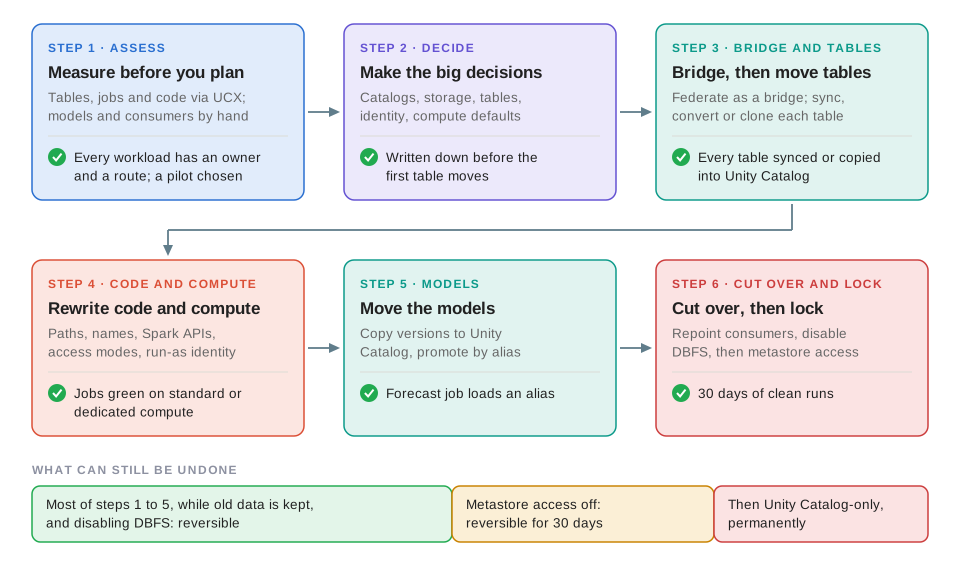 Six steps, each closed by a gate. Until the lock, most changes can be rolled back while the old data is kept; disabling the metastore becomes permanent after 30 days.
Step 1: Measure Before You Plan
The assessment is the cheapest part of the migration and the part that sets its price. Databricks' upgrade guide has nine steps, from moving identities to the account level to disabling the legacy features. An account admin is needed for the account-level setup (identities, groups and the metastore); the rest need workspace-admin rights or privileges on the objects involved. Before any of them starts, you want an inventory that answers four questions for every workload: which tables it reads and writes and what kind they are, what compute it runs on, which code paths assume DBFS or the Hive metastore, and who consumes its output.
UCX, the Databricks Labs migration toolkit, is still the most complete way to get that inventory. Its assessment crawls tables, UDFs, grants, mounts, jobs, clusters, pipelines, init scripts and workspace-local groups, estimates table sizes, guesses the external locations you will need and lints job code. Know what you are relying on, though: Databricks says UCX is "provided as-is" with no formal SLA, its last release was v0.60.1 on 3 October 2025, and its code migration workflow is "not yet available". Use it to measure, and plan the rewriting as engineering work.
| What to count | Why it drives the cost |
|---|---|
| Managed tables in the DBFS root | They have to be copied, and storage is doubled until the old ones are dropped |
| External tables, by format | External Delta tables keep their name, grants and history when converted; other formats need a conversion or a copy first |
Code that uses /dbfs, mounts, two-level names, SparkContext or RDDs |
No supported tool rewrites it in bulk; Genie Code helps one request at a time |
| Databases and tables nobody uses any more | Federation mirrors all of them, and they count against Unity Catalog's quotas |
| Jobs and clusters without an access mode, or on old runtimes | Each one needs a compute decision, and ML runtimes need dedicated compute |
| Registered models, and the code that loads them by stage | Stages do not exist in Unity Catalog |
| Consumers outside Databricks: BI tools, exports, other engines | Each one has to switch at a cutover you schedule |
| Workspace-local groups and personal tokens | Grants work only for account-level identities |
The gate: every workload has an owner, a target catalog and a route, and a pilot has been chosen. For the order, we follow a playbook published by Databricks staff: pilot one workload, then migrate in batches, external tables before managed ones, one workspace at a time.
The cheapest table to migrate is the one nobody created in the Hive metastore. The same playbook says to put all new workloads on Unity Catalog now. Take the catalog and storage decisions of Step 2 first, alongside the assessment rather than after it, then make that a rule.
Step 2: Make the Decisions That Are Expensive to Reverse
A handful of design decisions are cheap on paper and expensive to undo. They belong to leadership, not to whoever writes the first CREATE CATALOG.
- Catalog layout
- Catalogs are the unit of isolation, and Databricks recommends separating environments at the catalog level. We recommend one catalog per environment (dev, staging, prod), split further by domain only where ownership really differs; Databricks' deployment guide suggests typically 3 to 10 catalogs per metastore. Every workspace in a region shares one metastore, so by default a dev workspace can reach the prod catalog. Bind each catalog to its own workspaces: access from any other workspace is then denied, even to users with grants. The layout shows up in every three-level name, so decide it once.
- Where managed data lives
- Managed tables and volumes go to a managed storage location set at metastore, catalog or schema level. Databricks recommends catalog-level locations for isolation, and changing a location later affects only new objects, so decide before the first table moves. Keep it in the same region as the data: a location in another region can add transfer charges, and for patient data it is a residency question as well.
- Managed or external tables
- Databricks recommends managed tables, because predictive optimization, automatic liquid clustering and several other features work only on them. External tables still make sense where another engine owns the files.
- Identity
- Move SCIM provisioning to the account, replace workspace-local groups with account groups and give every production job a service principal. Hive metastore permissions do not carry over: every migration route ends with a step that grants account-level groups access again.
- Compute defaults
- Decide the access mode for each class of workload before anyone touches a workspace default. Changing the default access mode for jobs compute changes every job that never set one, all at once.
Two-level names resolve against a default catalog. Databricks suggests keeping hive_metastore as the default while you migrate, because changing it can break existing jobs, and the change takes effect only after clusters and warehouses restart. Move workloads to explicit names first, and switch the default at the end.
Step 3: Bridge with Federation, Then Move the Tables
Since March 2025 there has been a way to put almost all of the Hive metastore under Unity Catalog before moving a single file. Hive metastore federation mirrors the metastore as a foreign catalog. Its tables stay where they are but are read through Unity Catalog, with its privileges, row filters, column masks, audit and lineage, and they stay readable through federation even after direct metastore access is turned off. For the workspace's own metastore the foreign catalog is read-write, and Databricks describes it as "enabling incremental migration without code adaptation": switch one job's default catalog to the foreign catalog and its schema.table names keep working. The job still has to run on standard, dedicated or serverless compute, on a runtime that supports federation (13.3 LTS, 14.3 LTS, or 15.1 and later), with grants of its own.
Treat it as a bridge, not a destination. Databricks lets you keep the federated catalog permanently, but recommends completing the upgrade "to take full advantage of Unity Catalog features", and the bridge has gaps of its own. Federation does not translate legacy table ACLs into Unity Catalog privileges and does not support no-isolation clusters or Hive UDFs. It cannot read JDBC-backed tables, or tables with files outside the table's own folder, such as partitions stored elsewhere, and it reaches tables in the DBFS root or on mounts only from the workspace that owns the metastore. Foreign tables also miss the features reserved for managed tables. On a federated internal metastore, a DROP against the foreign catalog drops the object in the Hive metastore too, with no undo. And the bridge governs only the traffic that crosses it: until Step 6 closes the old routes, the same data is still reachable through hive_metastore, mounts and cluster credentials.
With the bridge in place, each table takes one of a few documented routes. Which one depends on the table's type in the Hive metastore, where its files are and which catalog it should end up in:
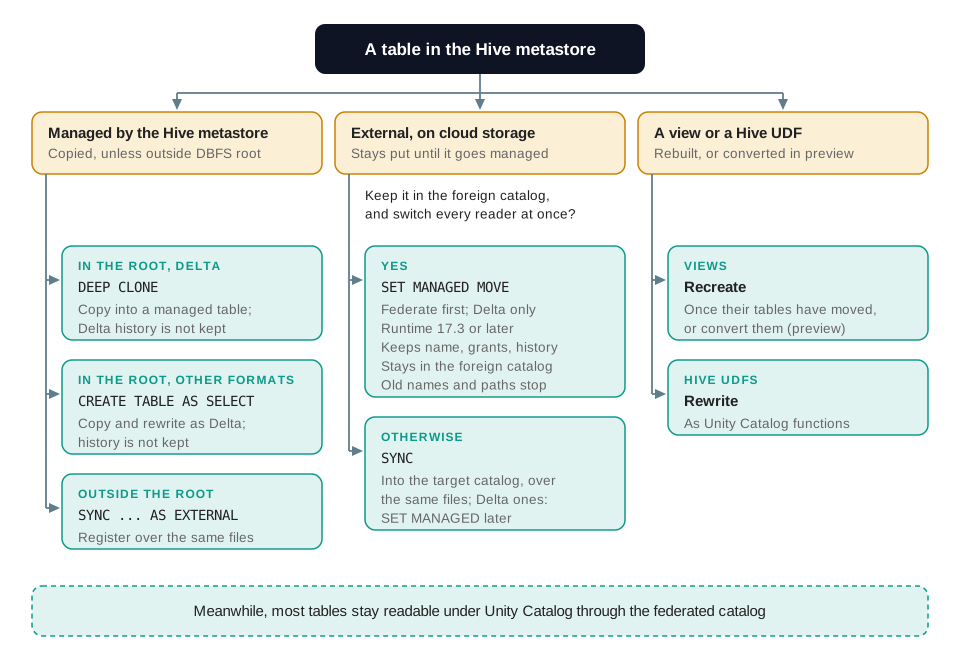 Which route a table takes depends on its type, where its files are and where it should end up. Federation keeps most tables readable under Unity Catalog while they wait their turn.
- External Delta tables can be converted through the bridge. Databricks' current upgrade overview recommends federating, then running
ALTER TABLE ... SET MANAGED MOVEon Databricks Runtime 17.3 or later: the table keeps its name, permissions and history, while its data and Delta log are copied into managed storage. The catch is the cutover: access through the old catalog and by path stops at that moment, with no redirect, so every reader and writer, including non-Databricks engines, must already use the Unity Catalog name. The converted table also stays in the foreign catalog, which becomes an ordinary catalog only when its connection is dropped. - External tables, and Hive managed tables stored outside the DBFS root, can be registered with
SYNCas Unity Catalog external tables over the same files, without copying; the managed ones needSYNC ... AS EXTERNAL, andSYNCadds a few properties to each source table. From then on, jobs on the bridge read them by their new names, because federation does not read Hive tables whose paths overlap Unity Catalog objects. The Delta ones convert to managed later withSET MANAGED, generally available since October 2025, which keeps the name, permissions and history; it keeps the old files for at least 14 days, and can be rolled back withUNSET MANAGEDwithin 14 days. Other formats needCONVERT TO DELTA(Parquet) or a copy first, andSYNCrejects Hive SerDe tables until they are Delta. One trap: a Hive managed table registered this way stays managed in the Hive metastore and still owns its files. Dropping it, or its schema, directly or through the federated catalog, deletes the data the new Unity Catalog table reads, and afterSET MANAGEDit deletes the old files and Delta log that rollback and path redirect rely on. Keep it until neither is needed. - Managed tables in the DBFS root have to be copied, with
DEEP CLONEfor Delta tables or CTAS for the rest. A copy is a new table: its Delta history and time travel are lost, and storage is doubled until the Hive tables are dropped. Dropping a Hive managed table deletes its files for good, so archive anything you are required to keep before it is dropped. - Views are recreated once their tables have moved by these direct routes; through federation they keep working in the foreign catalog and can be converted with
ALTER VIEW ... SET MANAGED, a Public Preview you apply for. Hive UDFs have no migration path: they are rewritten as Unity Catalog functions.
Mind where each table lands. A table converted through the bridge stays in the foreign catalog, while synced and copied tables land in the catalog you name. Converting through the bridge suits an estate of mostly external tables, which can give the foreign catalog its final name. Most of our platform's tables are managed tables in the DBFS root, which have to be copied into a catalog we create anyway, so we keep the foreign catalog as a temporary bridge and move every table into prod by the direct routes. In SQL:
-- External Delta table: check it, then register it in prod over the same files
SYNC TABLE prod.curated.appointments FROM hive_metastore.curated.appointments DRY RUN;
SYNC TABLE prod.curated.appointments FROM hive_metastore.curated.appointments;

-- Once every reader and writer uses the new name: make it managed (DBR 17.3+)
ALTER TABLE prod.curated.appointments SET MANAGED;

-- Managed Delta table in the DBFS root: it has to be copied
CREATE TABLE prod.features.patient_weekly DEEP CLONE hive_metastore.features.patient_weekly;
Path access to the old files is redirected after SET MANAGED only from Databricks Runtime 18.1, so anything that reads the table by path moves to the name first. The conversions themselves are quicker than most teams expect. For converting an external table to managed, Databricks estimates about 30 minutes of copying and one to two minutes of reader and writer downtime for 1 TB on a 2X-Large SQL warehouse, and about 1.5 hours and one to five minutes for 10 TB on a 4X-Large one. Readers on Databricks Runtime 16.4 LTS or later see no downtime, and streaming jobs on the table have to be restarted.
Databricks' upgrade overview now calls federate-then-convert "the recommended approach". Its table conversions were announced as Public Preview in November 2025, and no GA announcement has followed, although the pages no longer carry a preview label. Its last step, ALTER CATALOG ... DROP CONNECTION, is a Public Preview you have to apply for, and it cannot be rolled back. The conversions also need Databricks Runtime 17.3 and work only on tables that were external in the Hive metastore. The direct route's SET MANAGED, by contrast, has been generally available since October 2025. Whichever route you take, pilot it on tables you could afford to rebuild.
Step 4: Make the Code and Compute Unity Catalog-Ready
This is where most of the effort goes, because no tool does it end to end: UCX's code migration is not yet available, and Genie Code proposes changes one request at a time. Unity Catalog runs on two classic access modes. Standard (formerly shared) is the one Databricks recommends. It runs code through Spark Connect and does not support Databricks Runtime for ML, GPUs, R, RDD APIs or Hive UDFs. SparkContext and sqlContext are not available there, in Scala or, from Runtime 14.0, in Python, and direct JVM access fails by design. spark-submit tasks are deprecated on every access mode and do not run on Runtime 17.3 or later, so they have to be replaced wherever they run: with JAR tasks for JVM workloads and with notebook tasks for R scripts. Dedicated (formerly single user, and now assignable to a group) runs the ML runtime and the APIs that standard compute refuses.
For our platform that splits the work cleanly. The feature and reporting jobs move to standard compute, or to serverless once they fit its stricter limits, such as no init scripts and almost no Spark configuration. The training and forecasting jobs move to dedicated compute, because they need the ML runtime. Every job spec gets an explicit access mode and a service principal as its run-as identity, with grants on exactly what it uses. Grants are checked as the job runs, not all at the start, so a job with a missing grant can fail halfway through.
The changes are small line by line. Here is the landing step, in simplified form:
# Before: Hive metastore era
raw = spark.read.json("/mnt/landing/app_events/")
(raw.withColumn("source_file", input_file_name())
    .write.mode("overwrite").saveAsTable("features.app_events"))

# After: Unity Catalog
raw = spark.read.json("/Volumes/prod/landing/raw/app_events/")
(raw.withColumn("source_file", col("_metadata.file_path"))
    .write.mode("overwrite").saveAsTable("prod.features.app_events"))
That is three changes: a mount becomes a volume, input_file_name(), which Unity Catalog does not support, becomes the hidden _metadata column, and the table gets its catalog. In real code the catalog arrives as a job parameter rather than a literal, so the same code runs against dev and prod. Multiply the changes by every helper and notebook that reads a path or names a table, and you have the bulk of the estimate. The rest of the rewrite list is predictable:
- RDDs and SparkContext → the DataFrame API and Arrow UDFs,
spark.confinstead ofsparkContext.getConf,spark.addTaginstead ofsetJobDescription - Managed Parquet tables → Delta: Unity Catalog managed tables must be Delta or Iceberg, so a write that creates a managed Parquet table has to change
- Scratch space under
/dbfs/tmp→ a volume. Volumes need Runtime 13.3 LTS or later (on older runtimes a write to/Volumescan appear to succeed and land on the cluster's local disk), and they support neither appends to existing files nor random writes, so files such as Zip or Excel are written locally first and copied in - Credentials in the Spark configuration → storage credentials and external locations. Creating an external location puts its path under Unity Catalog grants at once, which can stop jobs that have none; fallback mode on the location lets them keep their old credentials during the migration, and the audit system table records every use of it
- Cluster Spark properties → checked against the list that standard compute rejects outright from Databricks Runtime 19
- Init scripts and wheels on DBFS → volumes; on standard compute an admin also adds the init scripts to the allowlist, while wheels need only read access to the volume
- Tests that use two-level names → tests that use three-level names, so CI fails where production would
One trade-off matters before the ML jobs move. Dedicated compute does not enforce row filters and column masks itself: it hands those queries to serverless compute, billed separately. It can read such tables only on Databricks Runtime 15.4 LTS or later, in a workspace enabled for serverless compute (16.4 or later if the masks come from ABAC policies), and it can write to them only from 16.3, through MERGE or an append. On a platform that masks patient data, that is a design input. In ours, the training and forecasting jobs read only the clinic and region totals, so they never query a masked table; the feature jobs that read the patient-level tables run on standard or serverless compute, which apply the masks themselves.
Jobs created through the API without an access mode run on no-isolation shared compute. A workspace admin can set a default access mode for jobs compute, and Databricks recommends standard or dedicated once workloads are on Unity Catalog, but the change applies to every such job at the same moment, including the ones nobody has migrated yet. Set the access mode in each job spec as you migrate it, and change the default last.
Step 5: Move the Models Without Breaking the Forecast
Models are the part of the platform where the way a team works changes, not just where things live. In Unity Catalog, models get three-level names, every new version needs a signature, and stages are gone: no Staging and Production, no stage transitions and no registry webhooks. Promotion becomes moving an alias such as @champion from one version to another, and stage approvals move to deployment jobs. With MLflow 3 the default registry is already Unity Catalog. The Workspace Model Registry is labelled legacy rather than deprecated, but Databricks tells Unity Catalog workspaces not to use it.
That default can break the forecast before you get to this step. Databricks Runtime 17.3 LTS ML is the first long-term-support ML runtime to ship MLflow 3, so after an upgrade to it, legacy code that loads models:/demand_model/Production without setting a registry URI starts looking for it in Unity Catalog. Until the models move, pin the old registry with mlflow.set_registry_uri("databricks").
# Before: Workspace Model Registry, promotion by stage
model = mlflow.pyfunc.load_model("models:/demand_model/Production")

# After: Models in Unity Catalog, promotion by alias
mlflow.set_registry_uri("databricks-uc")
model = mlflow.pyfunc.load_model("models:/prod.ml.demand_model@champion")
Existing versions do not have to be retrained. MlflowClient.copy_model_version(), available from MLflow 3.4.0, copies them to a Unity Catalog name, with a flag for older versions that have no signature; 17.3 LTS ML bundles MLflow 3.0.1, so install a newer client first. Permissions, stages and notifications do not come with them; they are rebuilt as grants, aliases and tags. Experiment artifacts sit in Databricks-managed DBFS storage by default. Databricks recommends a volume as the artifact location for Unity Catalog workspaces, and the lock makes the switch necessary: once DBFS root is turned off, MLflow tracking outside Unity Catalog can no longer use DBFS. Keep the copied versions, and record the model version with every forecast: an alias moves, so only the version number can tell you later which model made which forecast.
Step 6: Cut Over the Consumers, Then Lock the Hive Metastore
The last tables to move are the ones other people read. BI tools and other JDBC or ODBC clients need an explicit catalog on the connection, or three-level names in their queries. Exports that land as files in storage stay outside Unity Catalog's permissions, audit and lineage until they move to a volume or become tables. And anything outside Databricks that reads a table by path has to switch to its Unity Catalog name before that table is converted to managed, because the conversion moves the data away from the path it reads.
Before the lock, take stock of the few actions that cannot be undone, in this plan or on the bridge route, and agree who signs off each one:
| Action | What cannot be undone | Who should sign it off |
|---|---|---|
| Dropping a Hive managed table after its copy | Its files are deleted, and the Hive metastore has no UNDROP |
The data owner, after the 30-day window, once the copy is reconciled and an archive copy verified |
A DROP through the federated catalog |
It drops the object in the Hive metastore too | The data owner |
SET MANAGED on a synced table |
Rollback with UNSET MANAGED only within 14 days |
The platform lead |
ALTER CATALOG ... DROP CONNECTION, on the bridge route |
It cannot be rolled back | The platform lead |
| Disabling Hive metastore access | Permanent after 30 days | The CTO |
Locking the metastore itself involves five things:
- Point every workload at Unity Catalog Explicit names everywhere, and a Unity Catalog catalog as the workspace default (Databricks will not let you disable Hive metastore access while the default is still
hive_metastore), followed by a restart of clusters and warehouses. - Disable DBFS root and mounts A reversible setting: the paths stop working everywhere and runtimes below 13.3 LTS are disabled, but nothing is deleted, and turning it back on restores access.
- Remove cluster credentials and enforce user isolation Disabling metastore access does not remove instance profiles or service-principal credentials set on clusters, and no-isolation clusters ignore the setting; Databricks says to turn on Enforce user isolation as well.
- Disable direct Hive metastore access Jobs against Hive tables fail and the
hive_metastorecatalog disappears from Catalog Explorer. Fallback mode on external locations switches off too, so a job still on its old storage credentials fails there. Access through the federated catalog keeps working. - Wait 30 days Until then the switch can be reversed. After that, the workspace is Unity Catalog-only for good.
Treat the reversible window as a test, not a formality. Rehearse the lock in a non-production workspace first. Then, before day 30, run every scheduled job in the inventory at least once, and force a run of the quarterly and annual ones rather than waiting for their dates. After day 30, direct access cannot be switched back on, and a forgotten job is no longer a rollback but a rewrite under pressure.
Migration Flow: One Forecasting Pipeline Through the Migration
Put together, this is what happens to the platform's weekly forecasting pipeline, the one that reads the latest extracts, builds features, forecasts demand for every clinic and region and refreshes the dashboards. The figure at the top of this article shows where it starts and where it ends.
- Inventory The assessment lists the pipeline's tables and their types, its mount, the helpers that write to
/dbfs/tmp, an RDD step, a model loaded by stage and the two consumers of its output. - Bridge The metastore is federated as a foreign catalog, which the pipeline's jobs use as their default catalog while the workspace default stays
hive_metastore. The pipeline moves to dedicated compute, which can still reach DBFS while its code is unchanged, running as a service principal: its table names keep working, and its table reads and writes now go through Unity Catalog's grants and audit. - Code and storage The mount becomes an external location with a volume, scratch files move to a volume, the RDD step becomes a DataFrame operation and the cluster credentials go. The feature jobs move to standard compute.
- Tables The external Delta tables are registered in
prodwithSYNC, the jobs that use them switch to theprodnames at the same moment, and the tables are made managed once every reader has followed. The feature tables in the DBFS root are copied intoprod.features, withDEEP CLONEfor the Delta ones and CTAS for the Parquet ones, reconciled against the originals and switched over the same way. The originals are kept rather than dropped. - Model The registered versions are copied to
prod.ml.demand_model, the current production version gets the@championalias, the forecasting job loads the alias, and the training experiment gets a volume as its artifact location. - Consumers The BI connection gets
prodas its catalog, and the dashboard reads the CSV exports from a volume. Analysts and BI users need only the clinic and region figures, so they are granted the reporting tables and none of the patient-level ones. Column masks hide identifying columns from the data team and the jobs that do read the patient-level tables. - Lock Once every job runs clean on the new paths, the workspace switches its default catalog to
prodand enforces user isolation, then disables DBFS root and mounts, then direct metastore access, and the 30 days start. The foreign catalog stays open only to the platform team, so the old routes around the masks are closed to everyone else. After the 30 days, the kept Hive tables are deleted with the data owner's sign-off, once an archive copy has been verified. The archive holds patient-level data too, so it is kept under Unity Catalog grants, open only to the platform team, with a deletion date of its own.
What the sequence buys is that the pipeline keeps running at every step, either on the bridge or on the new path, with only the brief switch-overs of each conversion. And until the lock most changes have a way back: the Hive originals of the copied tables are kept, but a table converted with SET MANAGED can be rolled back with UNSET MANAGED only within 14 days, after which Databricks can delete the old files that its synced Hive table still points to. Treat each conversion as final after two weeks.
Wait, Migrate Gradually or Cut Over at Once? Choosing the Migration Strategy
The routes above are mechanics. The strategy is a leadership choice, and the published case studies show that both ends of it work. Here is our read of the three options:
| Wait | Incremental, pipeline by pipeline | Prepared big-bang cutover | |
|---|---|---|---|
| Spend now | ● none now, all of it later | ● spread over months | ● concentrated in preparation |
| Exposure to the Hive metastore deadlines | ✗ full | ● shrinks with each pipeline | ✓ gone after cutover |
| Risk concentrated in one night | — | ✓ no | ✗ yes |
| Legacy and Unity Catalog side by side | — | ● for months | ✓ briefly |
| Unity Catalog features available | ✗ none | ● pipeline by pipeline | ✓ all at once |
| Published example | — | Databricks: 10 months, four engineers | Ensemble: about 10,000 tables in one night |
Our recommendation for a forecasting platform like this one is the middle column, with a federation bridge in front of it; federation only became generally available after Databricks' own migration had finished. Migrate one pipeline at a time, starting with a pilot that crosses every layer: a table of each kind, a model, a consumer and a job identity. The bridge takes the deadline pressure off, and the pilot turns the estimate into a measurement. A big-bang cutover suits estates with strong tooling and a quiet window, and it is only as good as the preparation behind it.
What It Costs, and What Drives the Cost
The licence is not where the money goes: Unity Catalog needs no separate licence and is included in the Premium and Enterprise tiers, so you pay for the compute and storage you use. The tier can cost something, though. On AWS and GCP the remaining Standard-tier workspaces moved to Premium on 1 October 2025, and on Azure a phased move started on 1 October 2026. Azure's list rate for classic jobs compute is $0.30 per DBU-hour on Premium against $0.15 on Standard, and for all-purpose compute $0.55 against $0.40. Virtual machines are billed on top, so the whole bill rises by less than the rate. In Microsoft's own example of ten nodes for 100 hours, the jobs bill is $598 of machines plus $600 of DBUs on Premium, against $598 plus $300 at the Standard rate: by our arithmetic, about a third more rather than double. All of these are list prices, before any committed-use discount.
The cost of the migration itself is engineering time, plus a few line items that are easy to miss:
- Duplicated storage —
DEEP CLONEand CTAS keep two copies until the Hive tables are dropped,SET MANAGEDkeeps the old files for at least 14 days for rollback, and on the bridge route,SET MANAGED COPY, the variant that leaves the source table readable, keeps two copies by design. - Cross-region transfer — a managed storage location in a different region from the source data can add the cloud provider's transfer fees.
- Serverless line items — predictive optimization, data quality monitoring, data classification and the filtering that row filters and column masks need on dedicated compute all run on serverless compute and are billed at the serverless jobs rate, for example $0.35 per DBU-hour on AWS Premium in US East. Data classification counts three times and data quality monitoring twice, though Databricks' price list halves the latter to 1X until 31 January 2027; Microsoft's Azure SKU page shows 2X with no promotion. Predictive optimization is on by default for accounts created since 11 November 2024. Databricks has also been switching it on for older accounts, in a rollout it expected to finish by August 2026, and
SET MANAGEDturns it on for each converted table unless someone turned it off, so migrated managed tables will usually incur it. - The parallel run — two ways to the same data for as long as the migration lasts, plus the reconciliation that checks each copy against its source before anything switches over.
For effort, the only published figures come from case studies, and they vary with the estate. Databricks moved its own largest workspace, with about 2,500 data consumers, in 10 months with a four-person engineering team and no dedicated programme management, and removed Hive metastore access in February 2024. Nubank moved 1.1 million tables in more than 9 months, affecting more than 7,000 users and moving 50 petabytes between buckets. Ensemble cut over an estimated 10,000 tables in a single night, after several months of preparation that included a complete inventory and dependency validation.
None of the three breaks its time down, but all three put the weight on preparation, coordination and code rather than on moving data: Databricks credits lineage-based planning and managing the people and process around its 2,500 data consumers, Nubank called code migration its biggest technical challenge even while moving 50 petabytes, and Ensemble's one-night cutover followed several months of preparation. That is also how we would scope a platform like ours, by the number of jobs, helpers and consumers that assume the old platform rather than by the size of the warehouse. As for outside help, Databricks describes its own as advisory: the account team, a Delivery Solutions Architect and the open-source Labs tooling. We found no funded programme, credits or packaged price for migrations.
Benefits for Enterprise Data Governance
For a programme that holds health data, this is the part the board is actually buying. Everything in this table needs Unity Catalog, and the access controls protect data only once the old routes around them are closed:
| Requirement | How Unity Catalog delivers |
|---|---|
| Least-privilege access to patient-level data | Row filters and column masks (generally available since August 2024), and attribute-based access control with governed tags (since April 2026), applied once at catalog, schema or table level |
| Knowing where sensitive data is | Data Classification finds and tags sensitive columns (generally available since April 2026) |
| Answering "who read what?" | Audit and query-history system tables, queried with SQL; the audit table is in Public Preview |
| Tracing a number back to its source | Automatic table- and column-level lineage, across workspaces |
| Cost attribution | Billing system tables, including list prices |
| Pay-per-use compute | Serverless compute for jobs, notebooks and pipelines (serverless SQL warehouses on AWS and Azure do not need Unity Catalog), and predictive optimization on managed tables |
| Governed models | Models with three-level names, grants, aliases and required signatures |
| Sharing with partners, under grants and audit | Clean Rooms, and shares from Databricks' built-in OpenSharing server (formerly Delta Sharing), which needs the shared data in Unity Catalog on your side; partners can receive it without Unity Catalog |
| Open access for other engines | An Iceberg REST catalog, and Lakehouse Federation for querying other databases in place |
| AI on governed data | Genie and AI Search (formerly Vector Search) indexes work only with Unity Catalog |
Summary
The October change did not end the Hive metastore; it ended its future. Every new workspace is Unity Catalog-only, a metastore nobody uses may be switched off, the runtimes underneath keep expiring, and, on Databricks, the row filters, column masks and attribute-based access policies a regulated programme needs exist only in Unity Catalog. For a platform the business relies on every week, the question is no longer whether to migrate but whether the timing is yours.
We walked a composite forecasting platform through the migration. The inventory showed that most of the work is in code, not data. Five decisions on catalogs, storage, tables, identity and compute have to be made before anything moves. A federation bridge lets each pipeline move on its own schedule, each kind of table has a documented route, code, compute and models each need their own rewrite, and the lock at the end becomes permanent after 30 days.
If you run a platform like this one, start with the assessment. It is cheap, it turns opinions into counts, and it tells you which of the dates in this article you are actually exposed to. Then pick a pilot that crosses every layer, and let it set the estimate for the rest.
References
- [1] Databricks docs — Disable access to legacy features in new workspaces
- [2] Databricks docs — Migrate your account to UC-only workspaces
- [3] Databricks docs — Disable access to the Hive metastore used by your workspace
- [4] Databricks docs — End-of-support Databricks Runtime release notes
- [5] Microsoft Learn — Azure Databricks Standard tier end of life
- [6] Databricks docs — Upgrade a Databricks workspace to Unity Catalog
- [7] Databricks docs — Upgrade Hive tables and views to Unity Catalog
- [8] Databricks docs — Use the UCX utilities to upgrade your workspace
- [9] Databricks Community — From HMS to Unity Catalog: a self-service migration playbook
- [10] Databricks docs — Hive metastore federation
- [11] Databricks docs — Convert tables to Unity Catalog managed tables
- [12] Databricks docs — SYNC
- [13] Databricks docs — Disable access to DBFS root and mounts
- [14] Databricks docs — Standard compute requirements and limitations
- [15] Databricks docs — Default access mode for jobs compute
- [16] Databricks docs — Fine-grained access control on dedicated compute
- [17] Databricks docs — Manage model lifecycle in Unity Catalog
- [18] Databricks docs — Migrate model versions from Workspace Model Registry to Unity Catalog
- [19] Databricks — Unity Catalog (pricing FAQ)
- [20] Databricks blog — Databricks on Databricks: governance with Unity Catalog
- [21] Databricks — Nubank improves governance with Unity Catalog
- [22] Databricks — Ensemble migrates to Unity Catalog
- [23] Databricks docs — Row filters and column masks
- [24] Databricks docs — Unity Catalog managed tables
- [25] Databricks docs — Databricks Runtime release notes versions and compatibility
- [26] Databricks docs — Workspace-catalog binding
- [27] Databricks docs — Drop or replace a table
- [28] Databricks docs — What are Unity Catalog volumes?
- [29] Databricks docs — Hive metastore federation for a legacy workspace metastore (fallback mode)
- [30] Databricks docs — Databricks Runtime 17.3 LTS for Machine Learning
- [31] Databricks docs — High-level architecture
- [32] Microsoft Azure — Azure Databricks pricing
- [33] Databricks — Managed services pricing

Categories
- Pytorch (1)
- MLOps (1)
- Agentic (3)
- Big Data (5)
- Data Governance (1)
- Industry 4.0 (1)
- Databricks (1)
- Python (6)
- Ollama (2)
- Spark (1)
- Artificial Intelligence (1)
- LLM (3)
- PostgreSQL (4)
- CNN (1)
- MCP (2)
- Django (2)
- Machine Learning (4)
- Deep Learning (2)
- Industrial Automation (1)
- LangChain (1)